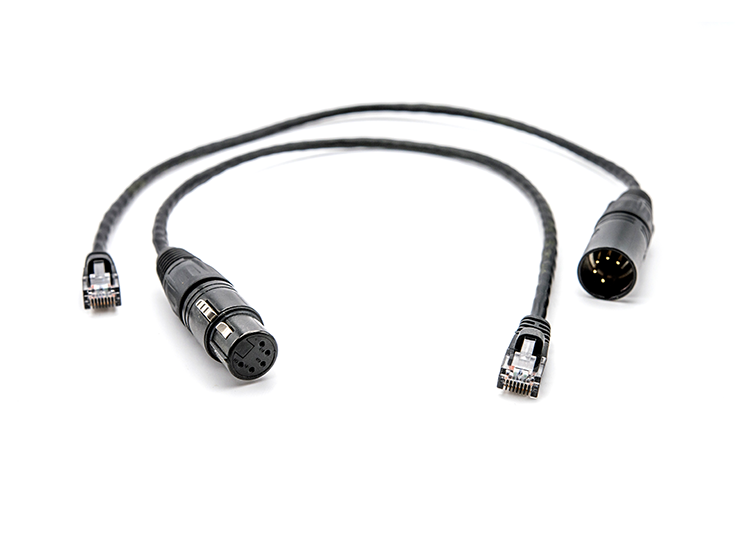

Rosco DMX 5-Pin Female to RJ45 Adaptor
A short adaptor with a 5-pin XLR female connector on one end and RJ45 on the other, for moving DMX between standard XLR cabling and Rosco equipment with RJ45 data ports. The female XLR end accepts the male end of a DMX cable, or plugs onto a male DMX input.

Image: Rosco
Bridges XLR DMX and RJ45 data
Many Rosco LED products use RJ45 connectors for DMX, while most consoles and DMX cable runs use 5-pin XLR. This adaptor joins the two.
- Converts between 5-pin XLR DMX and RJ45
- The female XLR end accepts the male end of a DMX cable, or plugs onto a male DMX input.
- Lets you use standard 5-pin DMX cable runs with RJ45-equipped Rosco gear
Where it fits in a DMX system
Console to RJ45 gear
Get from a 5-pin XLR console or DMX run onto an RJ45 data input.
RJ45 back to XLR
Return an RJ45 DMX output onto conventional 5-pin XLR cable to reach further fixtures.
Mixed rigs
Theatre, events and studio rigs that combine XLR fixtures with RJ45-equipped Rosco LED products.
What it is — and what it isn’t
Use it for
- DMX between 5-pin XLR and Rosco RJ45 data connections
- Mixed XLR/RJ45 Rosco rigs
- Pairing with Rosco Cat5 cables
Don’t use it for
- Ethernet networking (Art-Net/sACN) — this is a DMX adaptor
- Carrying power
- Other brands’ RJ45 DMX ports without checking — RJ45 DMX pinouts aren’t standard across all manufacturers
Connecting it
- Confirm the RJ45 port on your Rosco product is a DMX connection.
- Plug the XLR female end into the DMX input (male) or the male end of your DMX cable.
- Connect the RJ45 end with a Rosco Cat5 cable or directly to the RJ45 port.
- Test the DMX link from the console before the show.
Key details
| Brand | Rosco |
|---|---|
| Product code | 292000808602 |
| Connectors | 5-pin XLR female / RJ45 |
| Signal | DMX512 |
| Also available | DMX 5-Pin Male to RJ45 (Rosco 292000808601) |
| Compatibility | Rosco equipment with RJ45 DMX connections — contact us to confirm for your fixture |
Common questions
What does the female XLR end connect to?
A female XLR socket accepts a male XLR plug — so it connects to the male end of a standard DMX cable, or onto a device’s male DMX input.
Which Rosco products does it work with?
Rosco lists it with its RJ45 adaptors but doesn’t publish a compatibility list. It’s intended for Rosco gear with RJ45 DMX connections, such as RoscoLED Control Boxes — contact us to confirm compatibility for your fixture.
Do I need the male or the female version?
In DMX, outputs are normally female XLR sockets and inputs are male. Use the male adaptor to plug into a DMX output or female cable end; use the female adaptor to plug into a DMX input or a male cable end.
Will it work with other brands?
RJ45 DMX wiring varies between manufacturers, so we can’t guarantee other brands. Contact us to confirm compatibility.
Compatibility and specifications are from Rosco product data. If you’re unsure whether this suits your fixture or system, contact us to confirm before ordering. Information is a guide only.
Need help choosing?
Tell us which fixture or system you’re running and we’ll confirm the right accessory — and current availability — before you order.