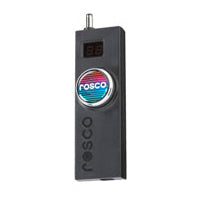

Rosco LitePad Single Fader Dimmer — flicker-free thumb-wheel dimming
A compact inline thumb dimmer that Rosco rates for smooth, flicker-free dimming of any LitePad with no colour temperature change. Digital display, push-button on/off and magnets to fix it to a metal stand. Max load 5 A (50 W). Limited stock.

Image: Rosco
Set the level right at the light
Fit it between the power supply and the LitePad(s), then dial the level with the thumb wheel and read it off the display.
- Flicker-free dimming of LitePads (per Rosco)
- No colour temperature shift as you dim (per Rosco)
- Thumb wheel with push-button on/off toggle
- Digital level display
- Magnets attach it to metal C-stands
- Handles up to 5 A (50 W)
Precise level control on small sources
Film & TV
Balance LitePads against the scene without adding ND or changing colour.
Photo studio
Fine-tune fill and accent levels on tabletop and portrait setups.
Theatre & events
Set practicals and display LitePads to the right level by hand.
What it is — and what it isn’t
Use it for
- Rosco LitePads on 12 V DC
- Loads up to 5 A (50 W) total
- Manual, hands-on level setting
Don’t use it for
- Loads over 5 A — split them across dimmers
- Remote or console control — use the Two Channel DMX Dimmer
- Mains-voltage fixtures — it’s a 12 V DC device
Getting the best result
- Add up the current of the LitePad(s) you’ll dim and confirm it’s under 5 A.
- Connect the dimmer between the 12 V DC power supply and the LitePad (or splitter).
- Fix it to a metal stand with its magnets if needed.
- Switch on with the push button and set the level with the thumb wheel.
Key details
| Input | 12 V DC |
|---|---|
| Output | 12 V DC |
| Max load | 5 A (50 W) |
| Control | Thumb wheel with push-button on/off |
| Display | Digital |
| Mounting | Magnets for metal C-stands |
| Rosco code | 290640000012 |
Common questions
Does the LitePad Single Fader Dimmer change colour temperature?
Rosco states it dims any LitePad smoothly and flicker-free with no colour temperature change. As always, check on camera at your frame rate and shutter.
How many LitePads can it dim?
As many as you can connect while keeping the total load under 5 A (50 W). Use a Y Splitter or 4-Way Spider after the dimmer to run several panels together.
Can I control it from a lighting desk?
No — it’s manual only. For DMX control use the Rosco Two Channel DMX Dimmer.
Limited stock — this item is being run out. Send us an enquiry to confirm availability and pricing before you plan around it. Check the combined current draw of every LitePad on a circuit against the rating of the power source and every cable in the chain, and test the setup before the shoot or show. Specifications are from Rosco data and are a guide only.
Check availability
This dimmer is limited stock. Email or call us to confirm availability.